



CyberSEO Pro version 12 introduces a groundbreaking advancement in AI integration: unrestricted support for custom AI endpoints and a significantly enhanced, unified engine format. This powerful upgrade also extends to RSS Retriever, CyberSEO Pro’s lightweight counterpart, boosting both tools’ flexibility and capabilities. Previously, the engine parameter within the [gpt_article] shortcode offered only a limited selection of fixed values. Now, this crucial parameter is accessible throughout the entire plugin—including the user interface—and accepts custom input with a flexible, free-form structure. This provides unparalleled freedom in selecting and integrating diverse AI models.
Effortlessly Integrate Custom AI Endpoints
Within the plugin’s settings, under the “Accounts” page, you’ll discover a new tab labeled Custom AI Endpoints. This intuitive interface allows you to register your own API endpoints for seamless use with CyberSEO Pro. This means you are no longer restricted to a predefined list of AI providers.
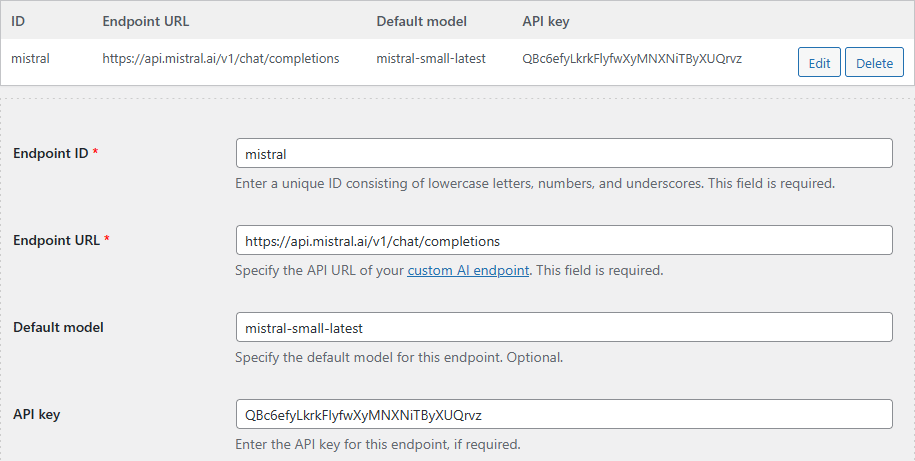
Registering a custom endpoint is straightforward. Each endpoint requires the following information:
- A unique ID (this ID will form the provider component of your engine string). Choose a concise and descriptive ID for easy identification.
- The complete endpoint URL (for example:
https://api.mistral.ai/v1/chat/completions). Ensure the URL is accurate and accessible. - Your API key (if the API provider requires authentication). Keep your API key confidential and secure.
- An optional default model ID. Specifying a default model simplifies the process for frequently used models.
After adding a custom endpoint and clicking Update settings, it immediately becomes available throughout the plugin—powering the rewriter, auto-commenting features, translation tools, shortcodes, and any field utilizing an engine string. This ensures consistent access across all plugin functionalities.
Let’s illustrate with a practical example. Imagine you want to integrate the Mistral API, an OpenAI-compatible service. You’d provide the endpoint URL, assign it the ID mistral, and if you prefer the mistral-small-latest model, your resulting engine string would be:
mistral-mistral-small-latest
This string can then be used within the plugin’s UI or within shortcodes, as demonstrated below:
[ai_generate engine="mistral-mistral-small-latest" prompt="Summarize this text: %post_content_notags%"]
The Specialized [custom_ai] Shortcode
For enhanced control over custom endpoints, the [custom_ai] shortcode provides a dedicated solution. Its functionality mirrors other shortcodes, but it allows for explicit separation of the endpoint ID and model ID:
[custom_ai id="mistral" model="mistral-small-latest" prompt="Identify yourself"]
If you’ve configured a default model within the endpoint settings, the model parameter becomes optional, simplifying your shortcode.
For comprehensive details on managing custom endpoints, please refer to: Custom AI endpoints.
It is important to note that when utilizing this setup within other plugin features like the rewriter, auto-comments, or translation tools, the corresponding engine value remains:
mistral-mistral-small-latest
Understanding the Unified Engine Format
A significant improvement in this release is the standardized method for identifying AI models across the plugin. Instead of choosing from a predetermined list, you now use a single, unified engine parameter. This parameter concisely specifies both the provider (or custom endpoint ID) and the model within a single string.
Here are a few examples:
openai-gpt-4o– OpenAImeta-llama/llama-3.1-405b-instruct– OpenRoutermistral-mistral-small-latest– Your custom Mistral endpoint
This simplified, unified syntax streamlines the process. For comprehensive details, consult the AI engine documentation: AI engine.
The Universal [ai_generate] Shortcode
The [ai_generate] shortcode has been enhanced to serve as the universal method for accessing any model from any provider. It requires the engine parameter and supports all standard OpenAI-style parameters (temperature, max_tokens, top_p, etc.), ensuring broad compatibility and customization.
Example:
[ai_generate engine="openai-gpt-4o" prompt="Summarize this text: %post_content_notags%"]
This versatile shortcode is the ideal choice when experimenting with new providers or self-hosted AI models.
Streamlined User Interface
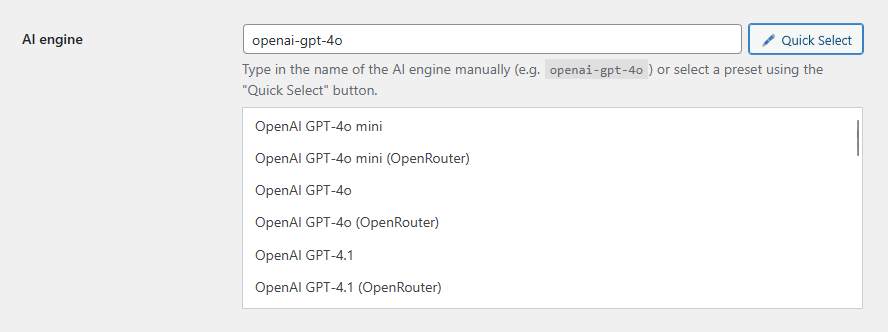
Plugin settings that previously required a model name now expect a complete engine string. To simplify this transition, a new Quick Select dropdown menu has been added, allowing for easy selection from common built-in models. Manual entry of engine strings, using the correct format, is also supported.
This update positions CyberSEO Pro as the most adaptable autoblogging plugin on the market. You are no longer constrained by a predetermined list of AI providers. Any API adhering to the OpenAI standard is readily integrable. Tailor your content creation process to your preferences, using the AI models you choose.
OpenRouter – One API Key to Rule Them All